eov v1.1.0 Release notes

Open whole-slide images like any other file.

eov is a desktop viewer for pathology slides. It opens SVS, NDPI, MRXS, DICOM, multichannel OME-TIFF, and many more, straight from disk. Plugins take it further: annotations, AI overlays, even a game controller.

Free and open source. Linux, macOS and Windows, on x86_64 and arm64. Also through Homebrew and Cargo.

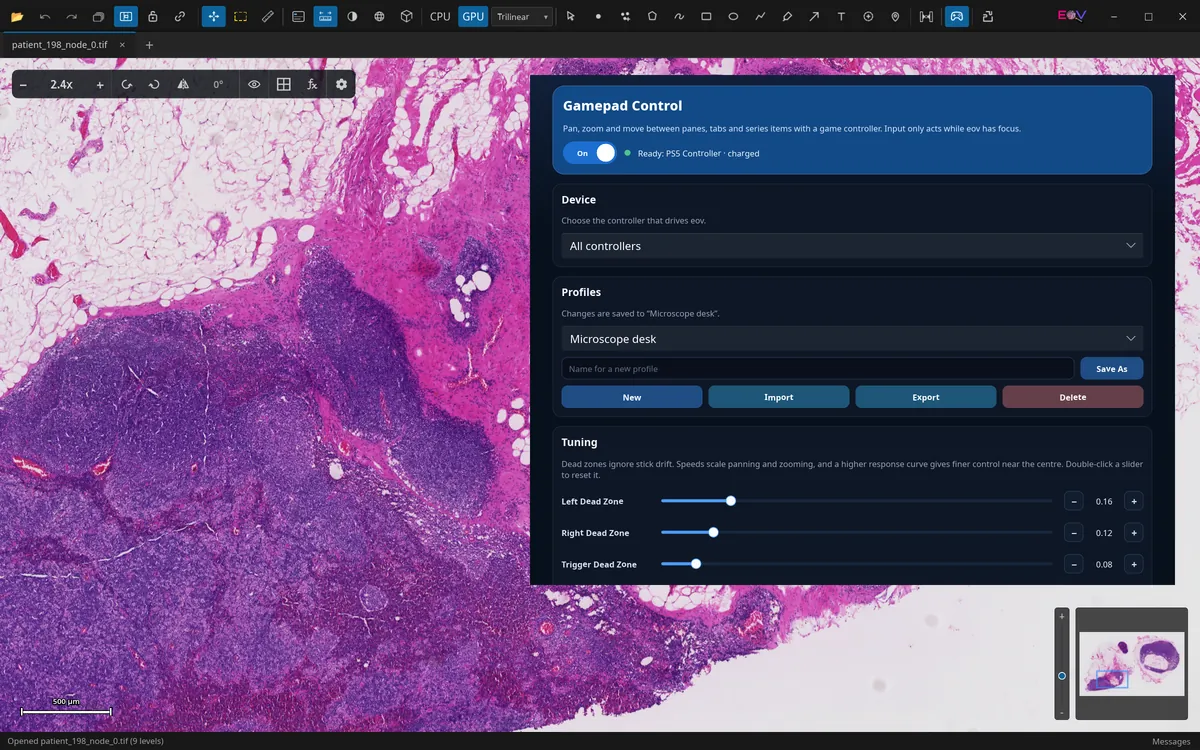
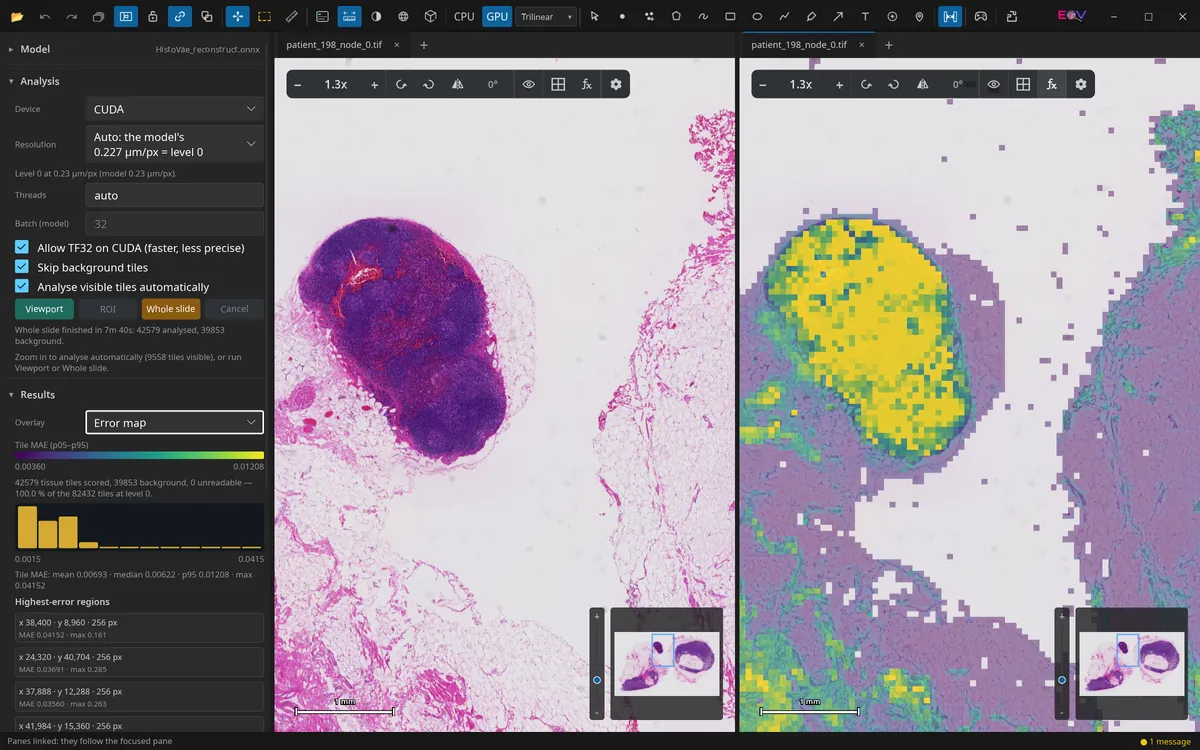
A 5.4-gigapixel lymph node scan (CAMELYON17, CC0) in eov 1.1.0.
Opens
SVS, NDPI, MRXS, SCN, BIF, CZI, DICOM, OME-TIFF, QPTIFF and more
Runs on
Linux, macOS and Windows, x86_64 and arm64
Speaks
31 languages, right-to-left included
Sends
Zero telemetry
License
MIT, Apache-2.0 or GPL-3.0

A viewer first

The core does one job: put a slide on screen and let you read it. eov is a native Rust application that renders on the GPU through Vulkan, DirectX 12 or Metal, and falls back to the CPU on virtual machines and remote desktops.

Side by side, in step

Open slides as tabs, drag a tab onto the edge of a pane to split it, and link panes so they pan, zoom and rotate together. Linked slides keep the same microns per screen pixel, so a 20× scan sits next to a 40× scan at matching scale, and serial sections can be aligned from two landmarks on each.

Colour
Gamma, brightness, contrast and sharpening, live on the GPU or the CPU.
Stains
Macenko and Vahadane normalisation; H&E deconvolution with each stain on its own.
Profiles
Scanner ICC profiles converted to sRGB on both renderers.
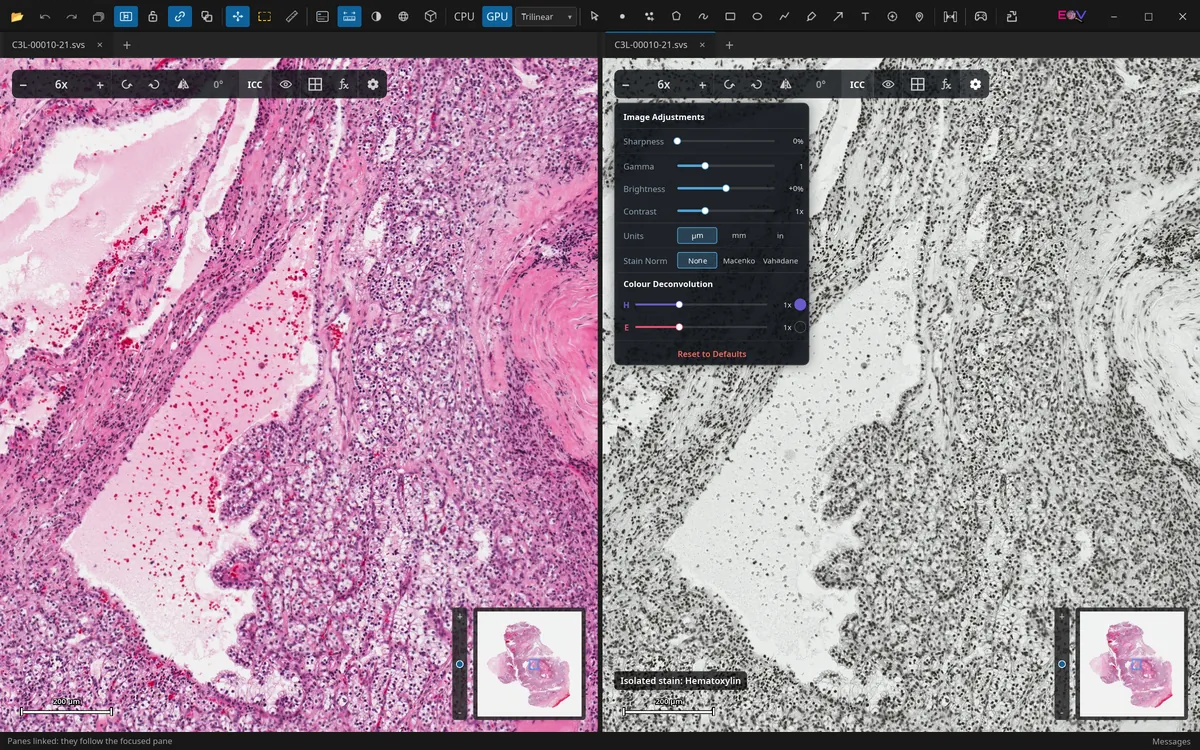
Two linked panes of a kidney tumour slide at 6×: on the left in H&E colour, on the right the hematoxylin channel only, in grey, with the Image Adjustments panel open
Linked panes on CPTAC-CCRCC C3L-00010-21 (CC BY 4.0). On the right, the hematoxylin channel isolated by colour deconvolution.

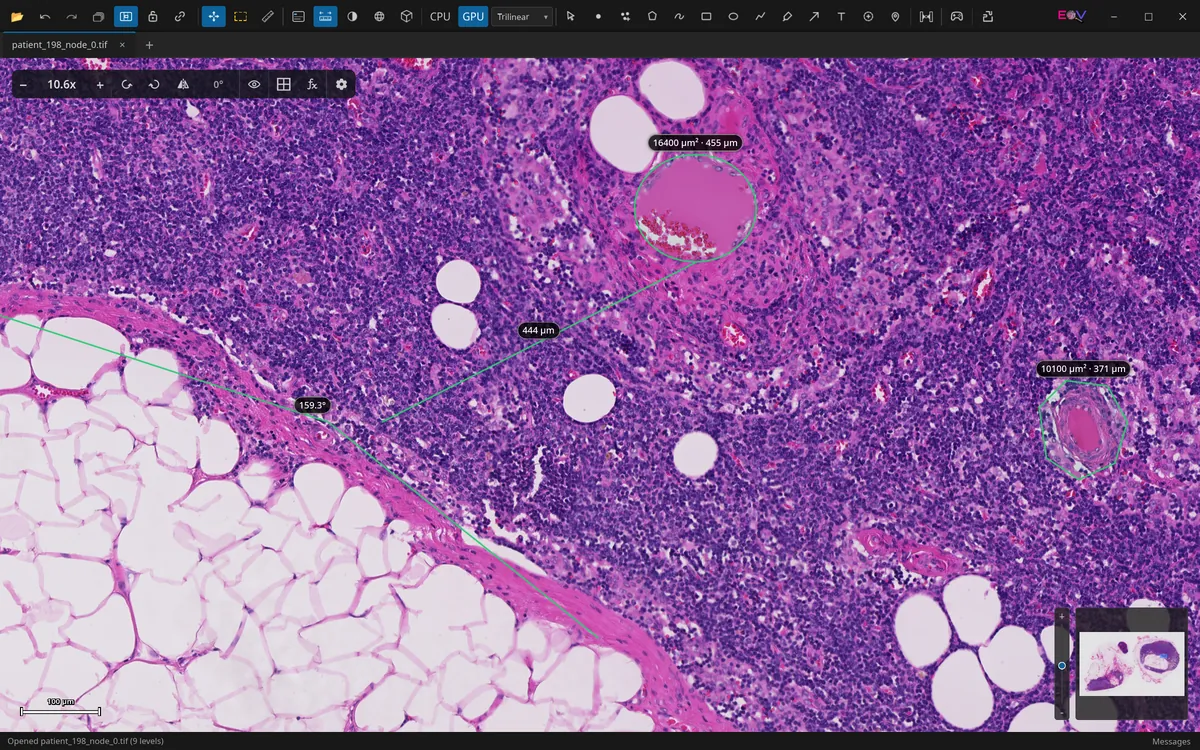
Measured in microns

Distances, paths, polygons, rectangles, ellipses and angles, labelled in the slide's physical units. The Measurements panel lists them for copying as CSV, and a region of interest feeds stain quantification for IHC: positive fraction, intensity bins and H-score.

Calibration
Read from the slide, or set by hand for slides without a pixel size.
Memory
Kept per slide and keyed by its content, so measurements follow a renamed file.
Undo
Every edit is one step of Ctrl+Z.
A lymph node at 10× with four measurements drawn over it: an ellipse around a blood vessel labelled 16400 square microns, a distance of 444 microns, an angle of 159.3 degrees along the capsule, and a polygon area
CAMELYON17 lymph node at 10× (CC0): an ellipse on a vessel, a distance, an angle along the capsule and a polygon area.

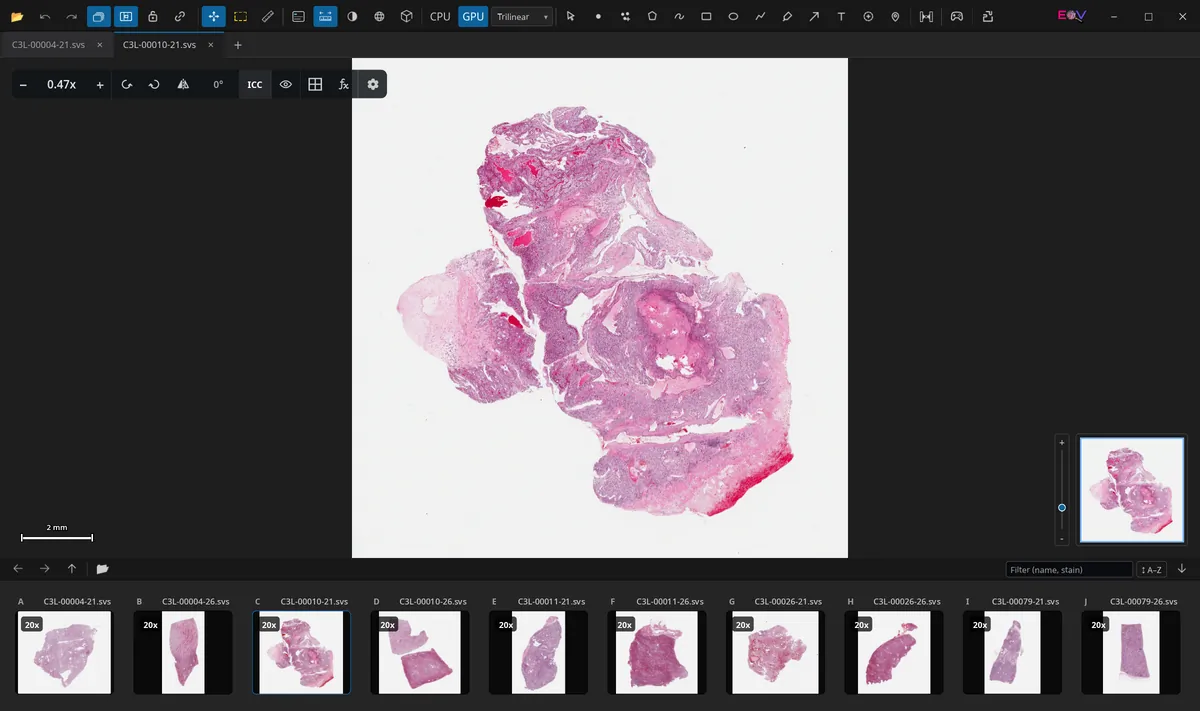
A folder is a series

Open a folder and its slides line up along the bottom of the window. Filter them, sort by name, date, stain or case, and step through with Page Up and Page Down. The case is read from the file name, so a patient's blocks sit together.

Sessions
The open slides and every pane's view come back at the next start.
One window
Slides opened from the file manager or a terminal become tabs of the running eov.
eov with a kidney slide open and a strip of ten slide thumbnails along the bottom, labelled A to J with their file names
The series bar over the CPTAC-CCRCC sample folder.

Also in the core

Rotation
Any angle, 90° and 5° steps, and mirroring. Overlays and exports follow.
Navigation
Minimap, magnification presets from 1.25× to 40×, fit to tissue, view history, named bookmarks.
Slide information
Label and macro images behind a privacy toggle, and every vendor property, searchable.
Fluorescence
OME-TIFF and Akoya QPTIFF multiplex, with colour, window and gamma per channel. Z-stacks and time series.
Tissue QC
Marks pen, possible folds and out-of-focus areas, for one slide or a whole cohort.
Heat maps
Lays another tool's output, such as a model's probabilities, over the slide.
Export
PNG, JPEG or TIFF at any size and DPI, with scale bar, overlays and a note of the processing.
Filtering
Lanczos, trilinear or bilinear, on the GPU or the CPU.
Keyboard
A shortcut for every action, remappable in config.toml. F1 lists them.
Accessibility
Dark, light, and high-contrast themes. Every control is named for screen readers.
Deep links
eov:// links open a slide at a position and magnification.
More formats
Plugins can add readers for formats OpenSlide does not cover.
Plugins

A small core, and plugins for the rest

Plugins are native libraries built against a versioned Rust API. eov checks each one before any of its code runs, stops a plugin that panics instead of going down with it, and installs official plugins from a catalog that every release pins by SHA-256.

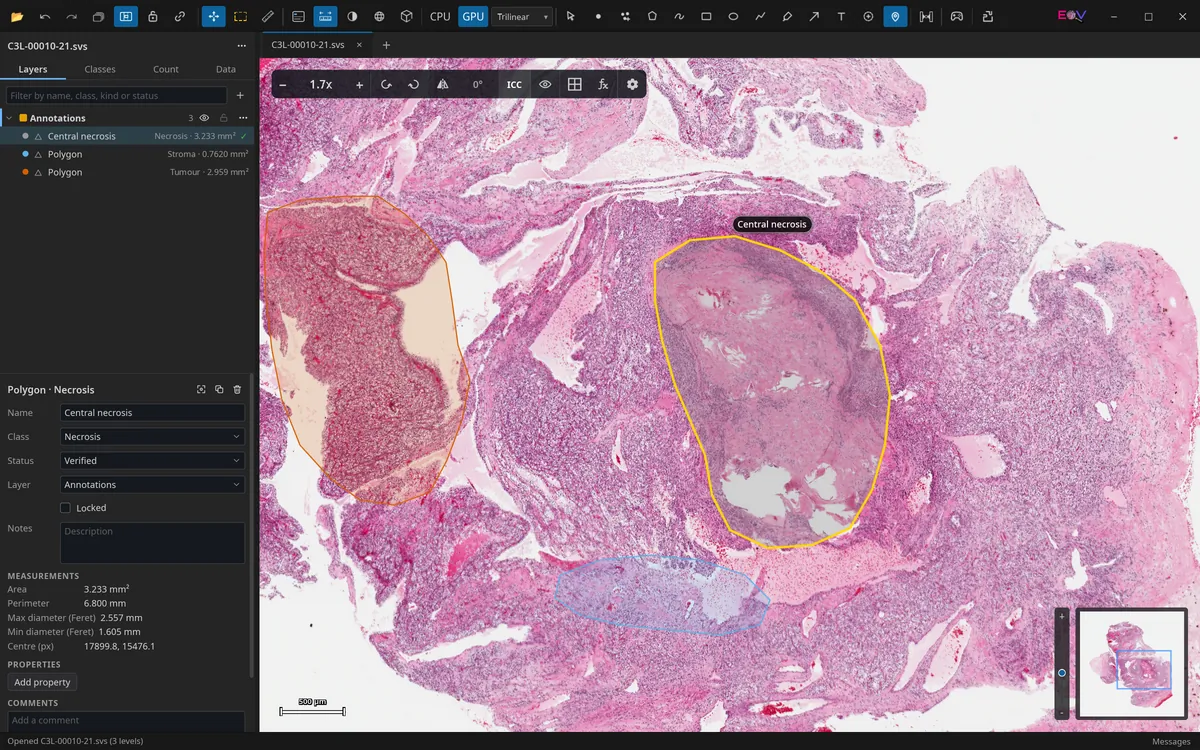
Regions, counts and comments, in the formats other tools read

Points, polygons, freehand outlines, brush strokes, rectangles, ellipses, lines, arrows and text, with reusable classes and hotkeys. Count cells with densities and a positive index, place high-power fields, track review status and comment threads, and make blinded copies for multi-reader studies. Imports and exports GeoJSON as QuPath writes it, ASAP and Aperio ImageScope XML, DICOM bulk annotations and CSV, and reads Hamamatsu NDPA.

Official catalog
eov plugin install annotations
eov-annotations-plugin on GitHub
The annotations panel beside a kidney slide with three outlined regions in orange, grey and blue; the selected region, named Central necrosis, shows its area, perimeter and Feret diameters
Three classified regions on CPTAC-CCRCC C3L-00010-21, with the selected region's measurements.

Write your own

A plugin is a Rust cdylib that implements one trait. It can read slide regions, draw overlay layers, register tools, hotkeys and toolbar buttons, open panels written in Slint, run viewport filters, read new slide formats and offer batch commands. The example plugin in the repository doubles as eov's end-to-end test.

plugin.toml
id = "hello"name = "Hello"version = "1.0.0"api = ">=1.0, <2"            # plugin API range[environment]version = ">=1.0.0, <2.0.0"  # eov versions
Languages

In 31 languages

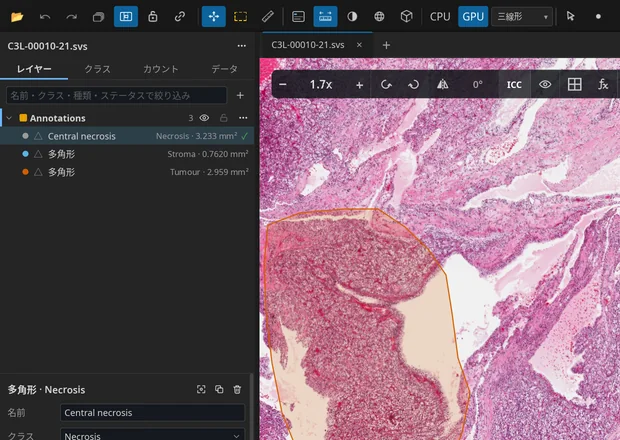
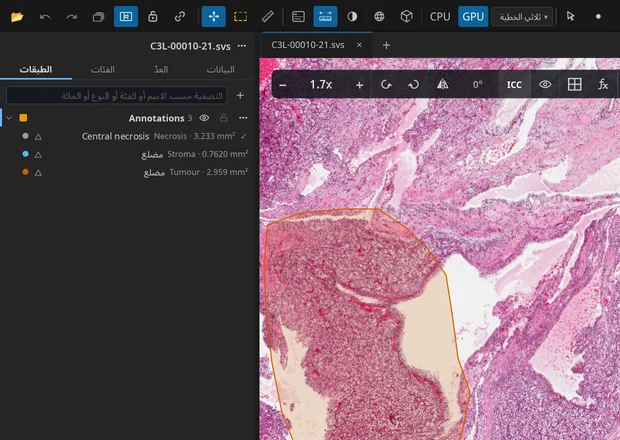
Menus, panels, dialogs and messages follow your system's language, or the one you pick from the globe button in the toolbar, and the official plugins switch with them. Slide names, metadata and the text burned into exported figures stay as they are, so a figure reads the same wherever it goes.

  • English
  • العربية
  • Čeština
  • Dansk
  • Deutsch
  • Ελληνικά
  • Español
  • فارسی
  • Suomi
  • Français
  • עברית
  • हिन्दी
  • Magyar
  • Bahasa Indonesia
  • Italiano
  • 日本語
  • 한국어
  • Norsk bokmål
  • Nederlands
  • Polski
  • Português (Brasil)
  • Română
  • Русский
  • Slovenščina
  • Svenska
  • ไทย
  • Türkçe
  • Українська
  • Tiếng Việt
  • 简体中文
  • 繁體中文
eov in Japanese: the toolbar, the annotations panel with its tabs and field labels in Japanese, and a slide with an outlined region
Japanese. The annotations plugin switches with the interface; class names are data and stay as written.
eov in Arabic: the annotations panel with its tabs, filter field and list laid out right to left
Arabic, like Hebrew and Persian, is laid out right to left.

Choosing a language

eov starts in your system's language when it has it, and in English otherwise. A choice in the language picker applies at once and is remembered. For a single run:

eov --language ja slide.svs

Help get it right

The translations were drafted by machine translation and checked by independent AI reviewers. None has been reviewed by a native speaker or a pathologist yet. If a phrase reads wrong in your language, open an issue or correct the catalog yourself with any PO editor; the translation guide takes a few minutes to read.

Command line

At home in a terminal

The same binary is a set of tools for scripts, cron jobs and pipelines, and anything that does not need a window runs without one. A running viewer can be driven over a local socket.

Shell
# two slides side by side, at a position and magnificationeov he.svs --pane ki67.svs --goto 300um,200um --zoom 20x# pen marks, folds and blur across a cohorteov qc --json cohort/ > qc.json# fixed-grid training patches, packed for a data loadereov dataset patches cohort/ --out ds/ \    --tile-size 256 --stride 256 --white-threshold 0.8eov dataset pack ds/ --format zarr# a pyramidal TIFF copy, de-identifiedeov convert case.svs share/case-01.tif --deidentify# a plugin's analysis over a cohort, with provenanceeov batch run eovae:analyze cohort/ --out vae/
Python
# eov_client.py: one file, standard library onlyfrom eov_client import Clientwith Client() as eov:  # finds the running eov    slide = eov.slides()[0]    tile = eov.read_region(slide=slide["file_id"],                           x=20000, y=14000, width=512,                           height=512, mpp=0.5)    open("tile.png", "wb").write(tile["data"])    eov.set_view(x="5000um", y="3500um", magnification=20)    eov.add_bookmark(name="Invasive front")

Scripts authenticate with a secret and can do what you can do in the window. scripting = false in config.toml turns it off.

Datasets
Patches at a chosen resolution with tissue filtering, QC exclusion, annotation labels and masks, stain normalisation, resumable runs and CSV or JSON metadata. Packs into zarr, HDF5 or CLAM coordinates.
Conversion
Pyramidal TIFF or OME-TIFF that OpenSlide, QuPath and libvips read, from a whole slide or a region. De-identification keeps an allow-list of metadata and drops the label and macro images.
Scripting
Open slides, move views, read regions as PNG or raw pixels, add measurements and bookmarks, quantify stains and export figures, from Python or anything that can open a socket.
Links
eov:// links open a slide at a position and zoom, from a spreadsheet of findings, a report or a laboratory system.
Privacy and control

Your slides stay on your machine

eov reads slides from disk and shows them. It runs no service, needs no account and reports nothing back. The network is used only when you ask for something that needs it, and only with your explicit permission.

No background traffic
No telemetry, no usage metrics and no update checks at startup. Updates, plugin installs and model downloads each ask before they go online.
Verified downloads
Every download is checked against the SHA-256 pinned in the release manifest before it is used, and signed manifests are verified against keys built into eov.
Offline updates
Air-gapped machines update from a folder or a USB drive, verified exactly like a download.
Managed deployment
A system policy file lets IT turn off self-update, third-party plugins or network access, and name the servers models may come from.
Reproducible workstations
eov plugin lock records the installed plugins by SHA-256, and eov plugin sync makes another machine match.
Audit log
Versions, plugins, installs and updates are written to a local audit log.
Install

Install eov

Prebuilt for Linux, macOS and Windows, on x86_64 and arm64. The current release is v1.1.0. Every file has its SHA-256 next to it on the release page.

Linux

The AppImage runs on any distribution with glibc 2.28 or newer (RHEL 8, Debian 10, Ubuntu 18.10 and later). Make it executable and start it.

chmod +x eov-v1.1.0-linux-x86_64.AppImage./eov-v1.1.0-linux-x86_64.AppImage

macOS

Homebrew
brew tap eosin-platform/eovbrew install --cask eov

Homebrew picks the right build for your Mac. eov is not notarized by Apple yet: if macOS refuses to open it, choose Open Anyway under System Settings, Privacy & Security.

Windows

Extract it and run eov.exe from the eov folder, with no installer and no administrator rights. Until releases are code-signed, SmartScreen asks once per version: choose Run anyway. eov register-file-types adds eov to Explorer's Open with.

Cargo

Any platform
cargo install eov

Builds from source against OpenSlide 4.0 or newer, which must be installed first.

No slides at hand? Two kidney cancer slides from The Cancer Imaging Archive's CPTAC-CCRCC collection (CC BY 4.0) make a quick first test: C3L-00004-21.svs (169 MB) and C3L-00088-22.svs (322 MB).

Open source

Free software, three licences to choose from

eov and its plugins are released under MIT, Apache-2.0 or GPL-3.0, whichever suits your project. Release packages bundle OpenSlide as a shared library under the LGPL-2.1, built from a pinned commit whose source is published with every release.

eov is part of the Eosin platform. For slides served to many people across an institution, see Eosin.